
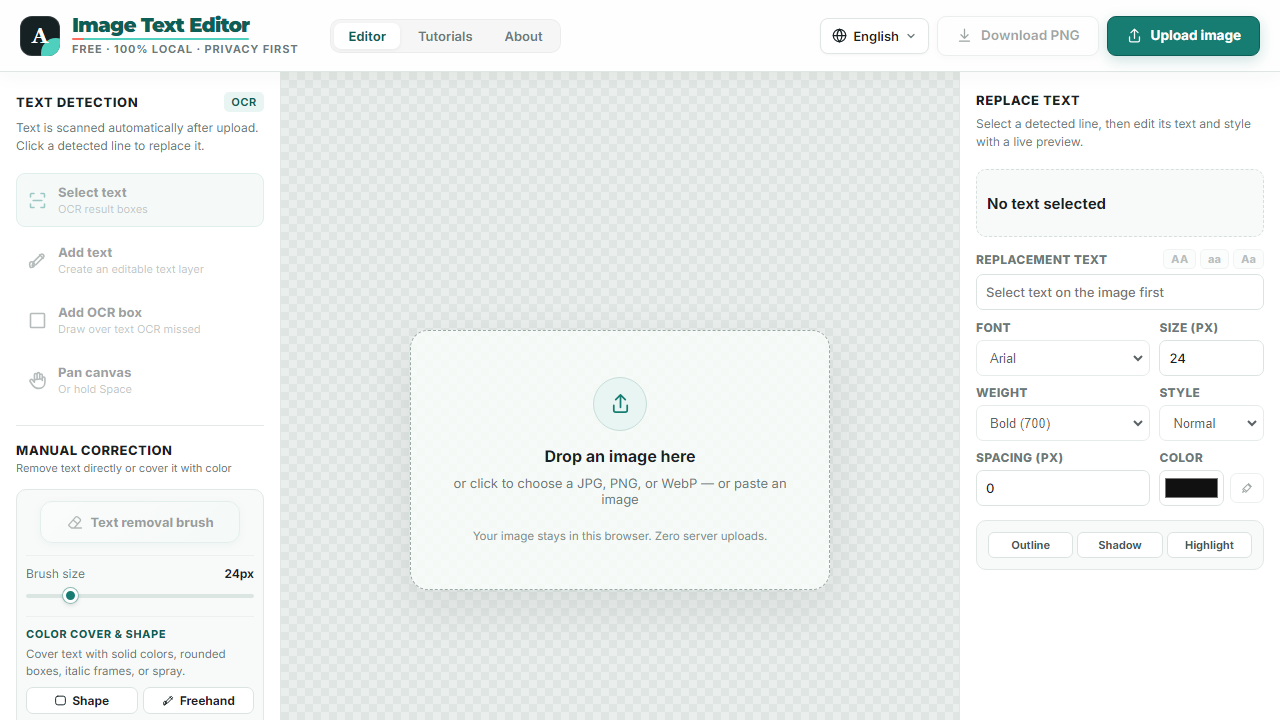
TypePatch is a free browser-based image text editor for updating words in screenshots, photos, and graphics. Users can open a JPG, PNG, or WebP image, let OCR detect text lines, and select the text they want to replace or remove. The editor includes controls for replacement fonts, size, weight, color, and spacing, along with options for adding text layers and manually correcting areas that OCR misses. Users can preview their changes and export the result as a PNG. The website states that images stay in the browser rather than being uploaded to a server. It is intended for people who need to make focused text edits without installing a desktop image editor.
Key features
- 01Automatic OCR text detection
- 02Remove or replace text in images
- 03Local image processing in the browser
- 04Export edited images as PNG
Screenshots
Reviews
Phyco does not write or buy reviews - be the first. A free account takes a minute: one account, one review, confirmed email.
Sign in or sign upSimilar listings
More Design & Creative → Blur BackgroundDesign & Creative
Blur photo backgrounds in your browser, adjust the effect, compare before and after, and download a static image.
 Image to ASCIIDesign & Creative
Free browser-based image to ASCII art converter with local processing.
 FomrixDesign & Creative
Generate 3D GLB assets from images or text, then inspect and convert models in your browser.
 Free Amazon KDP Book Cover GeneratorDesign & Creative
Create Kindle, paperback, and hardcover cover concepts for Amazon KDP with AI.
 EzImageAIDesign & Creative
Private prompt-based image editing and text-to-image generation
 Optimaza - Free Image Tools for Your BrowserDesign & Creative
Compress, resize and convert images or remove backgrounds with simple tools that run directly in your browser.